
Download Comment Explorer – AI‑Powered YouTube Comment Sentiment Analyzer
Why Comment Explorer Is a Must‑Have Tool for YouTube Creators
Comment Explorer is an innovative web‑based application that brings advanced artificial intelligence directly to the heart of your YouTube community – the comment section. While many creators focus on views and likes, the real pulse of a video lives in the words your audience leaves behind. This tool transforms raw comments into clear, actionable insights by automatically detecting sentiment, emotions, recurring topics, and engagement patterns. The result is a comprehensive, data‑driven picture of how viewers truly feel about your content.
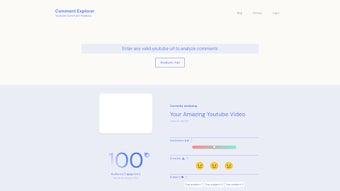
For creators who want to refine their messaging, improve audience retention, or simply understand which parts of a video resonate most, Comment Explorer offers a secure, cloud‑based environment that requires no local installation. After a quick sign‑up, you can connect any YouTube channel, select a video, and let the AI scan thousands of comments in seconds. The interface is built for ease of use – dashboards, visual graphs, and keyword clouds make complex data readable for anyone, regardless of technical background.
Beyond sentiment analysis, the platform lets you query comments with natural‑language prompts such as “show me all comments mentioning ‘pricing’” or “highlight comments expressing frustration.” This interactivity enables creators to respond quickly, craft follow‑up videos, or adjust future content strategies based on genuine viewer feedback. In short, Comment Explorer turns the noisy comment section into a strategic asset, helping you grow a more engaged and loyal audience.
Because the tool operates entirely in the cloud, you benefit from continuous improvements without ever having to download updates. Security is baked in: all data transfers are encrypted with HTTPS, and OAuth 2.0 ensures that your YouTube credentials never leave Google’s secure servers. The AI models are trained on millions of public comments, giving you industry‑level insight without the need for a data science team.
From a growth‑hacking perspective, the insights you gain can be repurposed for SEO‑friendly titles, thumbnail tweaks, or even community polls. By pinpointing the exact emotions that drive shares and comments, you can create more emotionally resonant content, which in turn improves watch‑time and algorithmic favorability. Whether you are a hobbyist creator aiming for the next viral hit or a brand manager seeking measurable ROI on video spend, Comment Explorer provides the data backbone needed to make informed, profitable decisions.
Core Features & AI Insights That Set Comment Explorer Apart
- Sentiment Scoring: Real‑time classification of comments into positive, neutral, or negative categories with a confidence score.
- Emotion Detection: AI identifies underlying emotions such as joy, anger, surprise, or sadness, allowing nuanced audience profiling.
- Topic Modeling: Automatic clustering of comments into recurring topics (e.g., “production quality,” “price,” “tutorial depth”) displayed in easy‑to‑read word clouds.
- Custom Query Engine: Type natural‑language questions to pull specific comment subsets, making deep dives fast and intuitive.
- Engagement Heatmaps: Visual representation of comment density over the video timeline, highlighting moments that sparked the most conversation.
- Export & Reporting: Download CSV, PDF, or JSON reports for offline analysis or sharing with team members.
- Secure Cloud Storage: All comment data is encrypted in transit and at rest, complying with YouTube’s API usage policies.
- Regular AI Model Updates: The platform receives quarterly model enhancements to stay current with evolving language trends.
Each feature is designed with the creator’s workflow in mind. For instance, the sentiment scoring panel groups comments by positivity, letting you see instantly whether a new product announcement was well received. Emotion detection goes a step further by surfacing frustration or excitement that might not be obvious from the raw text alone. Topic modeling automatically surfaces the most discussed subjects, so you can spot gaps in your content (e.g., viewers repeatedly ask for a deeper dive on a particular feature).
The custom query engine is especially powerful. Instead of manually scrolling through hundreds of comments, you can ask “What do viewers think about the background music?” and receive a concise list of relevant comments, complete with sentiment tags. This saves countless hours and turns raw feedback into precise, actionable data.
Finally, the export options mean that insights don’t stay locked inside the web app. Whether you need a quick snapshot for a sponsor meeting or a detailed analytics report for a brand partnership, Comment Explorer lets you generate professional‑looking documents with a single click. Exported files retain all sentiment scores and emotion tags, so downstream tools (like spreadsheet dashboards or BI platforms) can further slice and dice the data.
All of these capabilities are accessible through a responsive UI that adapts to desktop monitors, tablets, and even smartphones. The design follows modern UX principles: clear typography, contrast‑rich charts, and tooltips that explain each metric on hover. This ensures that even creators with limited technical background can extract maximum value without a steep learning curve.
Installation, Account Setup & Step‑by‑Step Usage Guide
Because Comment Explorer is a web‑based SaaS solution, there is no traditional “installation” process. All you need is a modern browser (Chrome, Edge, Firefox, or Safari) and an active internet connection. Follow these steps to start extracting AI insights from your YouTube comments:
1. Create Your Free Account
- Visit commentexplorer.com and click the “Sign Up” button.
- Enter a valid email address, create a strong password, and verify your account through the confirmation email.
- Optionally, connect your Google account for a one‑click YouTube channel import.
2. Link Your YouTube Channel
- From the dashboard, select “Add Channel.”
- Authorize Comment Explorer to access your YouTube Data API scope (read‑only access to comments and video metadata).
- Choose the specific channel you wish to analyze; multiple channels can be added under the same account.
3. Choose a Video for Analysis
- Navigate to the “Video Library” tab – all your uploaded videos appear with thumbnail previews.
- Click the “Analyze Comments” button next to the video you want to study.
- The platform fetches up to 10,000 recent comments (or the full comment set if you have a premium plan).
4. Interpret the AI Dashboard
- Sentiment Overview: Pie chart showing the percentage of positive, neutral, and negative comments.
- Emotion Radar: Radar graph visualizing the intensity of each detected emotion.
- Topic Cloud: Word cloud highlighting the most frequent discussion points.
- Heatmap Timeline: Scrollable bar indicating spikes in comment activity across the video’s duration.
5. Run Custom Queries
Type natural‑language prompts into the “Ask the Comments” box. Example queries:
- “Show me all comments mentioning ‘pricing.’”
- “What are viewers saying about the intro music?”
- “List the top 5 negative comments about the video length.”
The AI returns a filtered list, each entry tagged with sentiment and emotion, ready for quick copy‑paste or export.
6. Export Your Findings
When you’re satisfied with the analysis, click the “Export Report” button. Choose your preferred format (CSV for spreadsheets, PDF for presentations, JSON for developers) and download the file instantly.
Overall, the workflow is streamlined to require less than five minutes from sign‑up to actionable insights. The platform’s responsive design also works on tablets, allowing creators to review comment sentiment on the go.
For power users, an API endpoint is available in the premium tier, enabling automated nightly scans of new comments and direct integration with third‑party analytics dashboards such as Google Data Studio or Power BI. This extensibility ensures that Comment Explorer can grow alongside your channel’s data needs.
Compatibility, Pros & Cons, and Frequently Asked Questions
Supported Operating Systems & Browsers
Comment Explorer runs entirely in the cloud and is compatible with any device that supports modern web standards. Tested operating systems include Windows 10/11, macOS Monterey and later, Linux distributions with up‑to‑date browsers, iOS 14+, and Android 9+. Recommended browsers are Google Chrome (latest), Mozilla Firefox, Microsoft Edge, and Apple Safari. No additional plugins or extensions are required.
Pros and Cons
- Pros
- AI‑driven sentiment and emotion analysis delivers deep audience insights.
- Natural‑language query engine makes data retrieval fast and intuitive.
- Web‑only platform eliminates the need for local installations or updates.
- Secure, encrypted connection to YouTube API protects creator data.
- Exportable reports streamline collaboration with marketing or sponsorship teams.
- Quarterly AI model upgrades keep the technology state‑of‑the‑art.
- Cons
- Free tier limits comment fetches to 2,000 per video; larger channels may need a paid plan.
- Analysis is dependent on YouTube’s API rate limits, which can cause brief delays for very large comment sets.
- No built‑in video editing features – the tool focuses solely on comment analytics.
- Advanced customization (e.g., custom sentiment categories) is only available in enterprise plans.
FAQ – Answers Powered by Structured Data
Is Comment Explorer free to use?
Yes, there is a free tier that allows analysis of up to 2,000 comments per video. Premium plans start at $9.99 /month and provide unlimited comment analysis, priority support, and additional export formats.
How does the AI understand different languages?
The underlying model is multilingual and has been trained on millions of comment examples in over 30 languages. Sentiment and emotion detection work automatically for supported languages without extra configuration.
Can I analyze comments on private or unlisted videos?
Yes, as long as you have ownership rights and the appropriate YouTube API permissions. After connecting your channel, private and unlisted videos appear in the library and can be selected for analysis.
Is my data safe when I connect my YouTube account?
Comment Explorer uses OAuth 2.0 for authentication and never stores your API credentials. All comment data is encrypted both in transit (HTTPS) and at rest, complying with GDPR and YouTube’s data‑use policies.
How often are the AI models updated?
The development team releases model updates quarterly. Each update improves language understanding, expands emotion categories, and refines sentiment accuracy based on real‑world feedback.
Final Verdict & Call to Action
Comment Explorer bridges the gap between raw YouTube comments and strategic content decisions. By delivering AI‑powered sentiment, emotion, and topic analysis in a secure, browser‑based environment, it empowers creators of all sizes to listen more effectively to their audience. Whether you’re a solo vlogger looking to fine‑tune your next video, a brand manager seeking data for sponsor reports, or a marketing team wanting to benchmark audience sentiment across campaigns, the platform offers a fast, intuitive, and scalable solution.
The free tier provides enough power for small channels to test the waters, while the affordable premium plans unlock unlimited analysis and deeper reporting features. With regular AI model upgrades and a commitment to data privacy, Comment Explorer stands out as a reliable partner in the ever‑competitive YouTube ecosystem.
Looking ahead, the roadmap includes upcoming features such as automated sentiment‑driven thumbnail recommendations, integration with popular video‑editing suites for real‑time feedback, and a community‑driven marketplace for custom AI models. These enhancements will further tighten the feedback loop between creator intent and viewer reaction, ensuring that every piece of content you publish is backed by data‑driven confidence.
Ready to turn comments into actionable insights? Sign up for a free account today, connect your channel, and start exploring the emotions behind every viewer’s voice. Your next viral video may just be a sentiment insight away.
Comment Explorer delivers powerful AI insights in an easy‑to‑use web app. The sentiment dashboard, natural‑language query engine, and export options make it a must‑have for any serious YouTube creator. While the free tier’s comment limit can be restrictive for larger channels, the premium plans are reasonably priced and unlock the full potential of the platform.



.png)



